GTM Lite – Free Google Tag Manager & GA4 e-Commerce Module for PrestaShop
- 1.7.5 + | 8.x | 9.x
- PL, EN
- 1.2.0
- 2026-08-04
GTM Lite is a lightweight, free module connecting your PrestaShop store with Google Tag Manager. It automatically pushes essential e-commerce events to the dataLayer in full compliance with the requirements of Google Analytics 4, Google Ads, and Meta Pixel.
The ideal solution for merchants requiring a reliable, core GA4 sales funnel without database overhead or modifying theme templates.


Information Parameters:
- 1.2.0
-
Store Version PHP Version1.7.5 + 7.1 – 7.48.x 8.1 – 8.39.x 8.1 – 8.5
- 2026-08-04
- PL, EN
- ✅
- ✅
- ✅
- ✅
Quick Reference for Developers & Analysts (LITE Event Reference)
Everything you need in one place – the module injects five essential GA4 e-commerce sales funnel events into the dataLayer along with the following payload structure:
| Event Name | Trigger Moment | Passed Payload / Parameters |
|---|---|---|
view_item |
Viewing a product page | currency, value, items (item_id, item_name, price, quantity, optionally item_category) |
add_to_cart |
Adding an item to cart (PrestaShop updateCart event / AJAX) |
currency, value, items (item_id, item_name, price, quantity, optionally item_category) |
remove_from_cart |
Removing an item or reducing quantity in cart (updateCart: delete / op=down) |
currency, value, items (item_id, item_name, price, quantity, optionally item_category) |
begin_checkout |
Entering the checkout page with a non-empty cart (once per cart session) | currency, value (gross total excl. shipping), optionally coupon, items (list of items in cart) |
purchase |
Order Confirmation page (once per order session) | transaction_id, value, tax, shipping, currency, optionally coupon, items |
Key Architectural Advantages
- 100% Free Module (Free LITE Version) – A fully functional, complimentary integration ensuring all primary analytics objectives are met.
- Data Layer Reset (
ecommerce: null) – Automatically clears thedataLayerobject prior to triggering each e-commerce event, preventing data pollution or state leakage from previous user actions. - Transaction & Checkout Deduplication – The
begin_checkoutandpurchaseevents incorporate session-based locks to prevent duplicate firing when customers refresh the page. - Asynchronous Cart Tracking – The
add_to_cartandremove_from_cartevents are handled via background AJAX requests. Network errors or tracking script issues will never block cart or checkout operations. - Back-Office Privacy Protection – The GTM container script is injected exclusively on Front-Office pages. Your admin panel URL remains completely secure and invisible to tracking tools.
- Full PrestaShop Multistore Support – Allows distinct GTM Container IDs (
GTM-XXXXXXX) to be defined for each shop or shop group within a single installation.
Key Features
1. Back Office (Admin Panel)
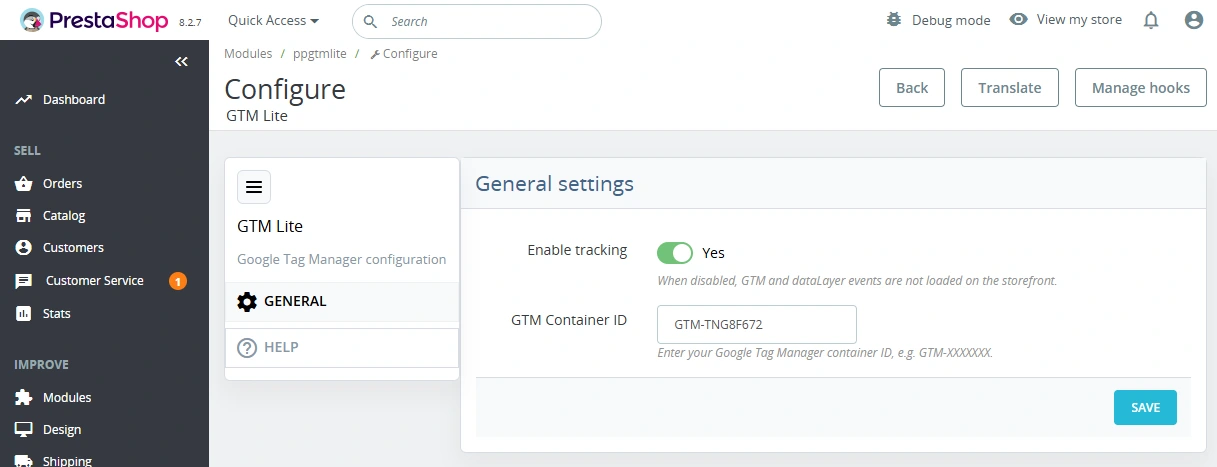
One-Click Enable / Disable
Quickly pause GTM script execution without uninstalling the module or losing your configuration settings.
Container ID Validation
Built-in format checking (GTM-XXXXXXX pattern) prevents accidental misconfigurations or typos.
Multistore Contextual Setup
Each store within a Multistore network can transmit data to a separate GTM container or share a global ID.
Automatic Update Checker
The help section provides a quick way to verify the availability of newer module releases directly from the panel.
2. Front Office (Data Layer & Scripts)
Standard GTM Script Injection
Embeds the container script in the <head> element and places the fallback <noscript> snippet immediately after the opening <body> tag.
Purchase Intent Tracking
Captures the fundamental sales journey: view_item → add_to_cart / remove_from_cart → begin_checkout → purchase.
What the Module DOES NOT Do (Clean Code & Zero Bloat)
We value your server resources. GTM Lite is engineered around the KISS (Keep It Simple, Stupid) philosophy:
- Does not create unnecessary tables inside your PrestaShop database.
- Does not overhead page loading with complex SQL queries.
- Does not automatically create tags or triggers inside Google Tag Manager – the module supplies the structured
dataLayer; you retain full control over tags and triggers within your GTM workspace.
Quick Implementation Guide
Post-installation Steps:
1. Install the module ZIP file in your PrestaShop Back Office and enter your Container ID (GTM-XXXXXXX).
2. Clear the PrestaShop cache.
3. Verify event firing using GTM Preview Mode or GA4 DebugView.
4. Publish your GTM container with the connected GA4 / Ads tags.
Important Notice!
Please create a complete file and database backup prior to installation. Extract the master package and upload the specific ZIP file matching your PrestaShop line and PHP version. Following configuration, publish your GTM container, clear the PrestaShop cache, and verify all five events using GTM Preview or GA4 DebugView. The module populates data into the dataLayer but does not automatically generate tags, triggers, or tag configurations inside your Google Tag Manager container.
## [1.2.0] - 2026-08-04

- Cosmetic fix: clarified English labels and help text in the module configuration.

## [1.0.0] - 2026-08-03

### Added

- Initial release of the module.
- GA4 ecommerce events: `view_item`, `add_to_cart`, `remove_from_cart`, `begin_checkout`, `purchase`.
You might also like


FAQs
-
Which GA4 e-commerce events does GTM Lite send?
The module sends five core e-commerce funnel events to the dataLayer: view_item, add_to_cart, remove_from_cart, begin_checkout and purchase. Each event includes relevant data such as value, currency and the product list.
-
Are the modules compatible with my version of PrestaShop?
Each module in our store contains information about compatibility with specific PrestaShop versions. Please check this information carefully before purchasing. If you are not sure, contact us.
-
How does the module prevent event data from being mixed?
Before each event, the module clears the ecommerce object by passing a null value. This prevents data remaining from previous user actions from being overwritten or carried over in the dataLayer.
-
Are checkout and purchase events deduplicated?
The begin_checkout and purchase events are protected at session level against repeated emission. This includes cases where a customer refreshes the checkout or order-confirmation page during the same session.
-
Does the GTM code also run in the Back Office?
Google Tag Manager code is loaded only on Front Office pages. The administration area is excluded from analytics, keeping administrative activity separate from data collected during customer visits.
-
Does the module create Google Tag Manager tags automatically?
The module provides the dataLayer and e-commerce events, but it does not automatically create tags, triggers or service configuration in the Google Tag Manager container. Configuration of these elements remains with the container administrator.
16 other products in the same category:
llms.txt for PrestaShop — Dynamic Store Index for AI Bots
AiLlmTxt publishes llms.txt and llms-full.txt files on the fly, without physical file generation on the disk — PrestaShop generates them dynamically under public URLs....

Google Maps Reviews Module for PrestaShop – Automatic Import and Display of Customer Ratings
This module serves to increase trust in your shop by displaying authentic reviews from Google Maps. Thanks to the automatic generation of JSON-LD structured data, star...

Login as Customer – Log into user accounts from PrestaShop Back Office
This module enables instant access to any customer account directly from the PrestaShop administration panel. It allows quick verification of issues reported by buyers...

Helpdesk — professional ticketing and customer support system for PrestaShop
PP Helpdesk is a module that turns chaotic email exchanges into a clear, organised ticketing system directly within your PrestaShop store. Customers can comfortably create...

- New
Hreflang and X-Default Normalisation for PrestaShop
Hreflang Pro solves the issue of directing shoppers to the wrong language version of your store (for instance, when a local customer lands on a foreign-language page from...

Smart Image Optimiser — Lossless Quality and Perfect PrestaShop Product Images
Smart Image Optimizer is an advanced tool that effectively eliminates the problem of automatic, lossy recompression of graphics files by PrestaShop's engines (GD/Imagick)....
- New
PrestaShop Omnibus Price Pro Module – Lowest Price in 30 Days (EU Omnibus Directive)
Omnibus Price Pro is an advanced PrestaShop module designed to automate the display of the lowest price prior to a discount (default 30 days). Ensure full compliance...

Content page system, an alternative to PrestaShop CMS Pages: categories, pages and FAQ with...
Frustrated by the limited capabilities of PrestaShop's native CMS? PP Page is a powerful alternative that transforms your shop into a fully-fledged publishing platform....

- New
Free Simple Omnibus Price Module – Omnibus Directive for PrestaShop
Simple Omnibus Price is a completely free PrestaShop module that automates displaying the lowest price from the 30 days prior to a price reduction. Protect your store...

Ask about product / price (PRO)
Ask about product / price (PRO) is an advanced PrestaShop module that adds an enquiry form on the product page and directly on the product list (categories, homepage,...
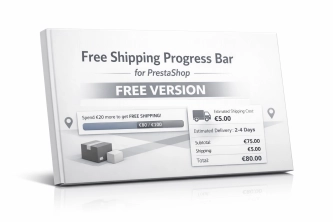
Free Shipping Progress Bar for PrestaShop (Free Version)
Encourage customers to spend more by clearly showing how much is left until they unlock free shipping . This is the free, simplified edition of the module, focused on one...

PrestaShop Promotion Module: Free Gifts, Quantity Discounts, Buy X Get Y and Category Offers
The PP Promo module for PrestaShop makes it easy to create and automate popular sales campaigns, from "Buy 2, Pay for 1" offers and free gifts to discounts on selected...


- Discount
Price available only until: 11.10.2026
Product recommendation module for PrestaShop
A recommendations module for PrestaShop that displays tailored product suggestions in two key points of the buying journey: the product page and the cart. It reduces...

Banner Manager – Highlight promotions, new arrivals and important messages precisely when the customer is most engaged in shopping. Instead of hiding your message in page...

PrestaShop Gallery Management – Shortcode Module
Looking for a better way to showcase images in your store? Advanced Image Gallery for PrestaShop is a purpose-built module that lets merchants create, edit, and embed...
Do you need additional features or custom solutions?
- Module customisation tailored to your specific requirements.
- Extending functionality to enhance your store's capabilities.
- Developing bespoke modules designed to meet your unique needs.
- Integrating external systems and additional tools.
- Optimisation and improvements for better performance and user experience.
Do you have ideas on how to improve this software? Share your suggestions for optimisation, new features, or bug reports – we’ll be happy to review them!