Clean URLs Pro – remove IDs from PrestaShop URLs
- 8.x | 9.x
- PL, EN
- 1.2.1
- 2026-07-21
Clean URLs Pro removes numerical IDs from product, category, CMS category, CMS page, brand, and supplier URLs — without core modifications and with zero overrides. Simply activate it for the required entity type, save the configuration, and clear the cache.
Legacy links containing IDs (e.g. /3-electronics) are automatically redirected to the new, clean URL via an HTTP 301 redirect, fully preserving SEO PageRank and all external backlinks.


Information Parameters:
- 1.2.1
-
Store Version PHP Version8.x 8.1 – 8.39.x 8.1 – 8.5
- 2026-07-21
- PL, EN
- ✅
- ✅
- ✅
- ✅
Key Benefits
- Clean URLs without IDs – products, categories, brands, suppliers, and CMS pages obtain shorter, cleaner routing paths (e.g.
/electronics/laptop.htmlinstead of/3-electronics/12-laptop.html), significantly improving CTR and URL aesthetics. - Zero overrides, zero core edits – the module operates exclusively via native PrestaShop hooks (
moduleRoutes,actionDispatcherBefore, etc.), completely eliminating conflicts during platform core upgrades. - Automated 301 redirect engine – changing a product or category slug instantly triggers an automated redirect rule, ensuring link equity and external backlinks are maintained without manual DB intervention.
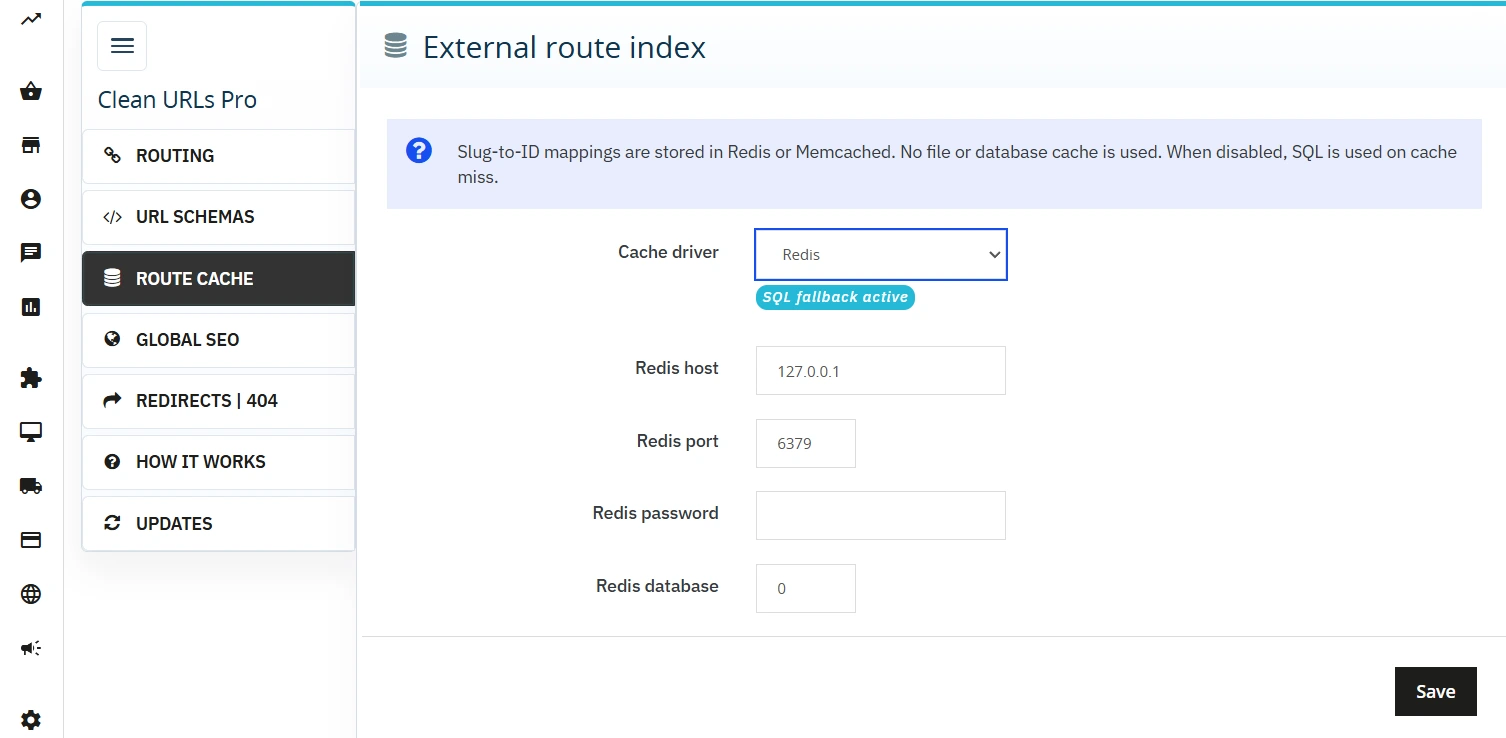
- High performance under heavy traffic – an external routing index powered by Redis or Memcached memory storage minimises SQL query overhead on front-end requests.
- Safe deployment workflow – no routing changes are applied automatically upon installation; each entity type is activated via an independent toggle, and the built-in conflict validator blocks saves if duplicate slugs are detected.
The Result – URL Schema Comparison
| Entity Type | Legacy Schema (with ID) | Clean Schema (No-ID) |
|---|---|---|
| Product | /3-category/product.html |
/category/product.html |
| Category | /3-electronics |
/electronics |
| CMS Page | /content/4-about-us |
/info/about-us |
| CMS Category | /content/category/1-home |
/info/category/home |
| Brand | /brand/3-acme |
/brand/acme |
| Supplier | /supplier/2-acme |
/supplier/acme |
Use Cases & Architecture
- Platform migrations & URL refactoring – seamless transition from legacy ID-based URLs to clean structures, featuring global HTTP 301 handling for the entire catalog tree.
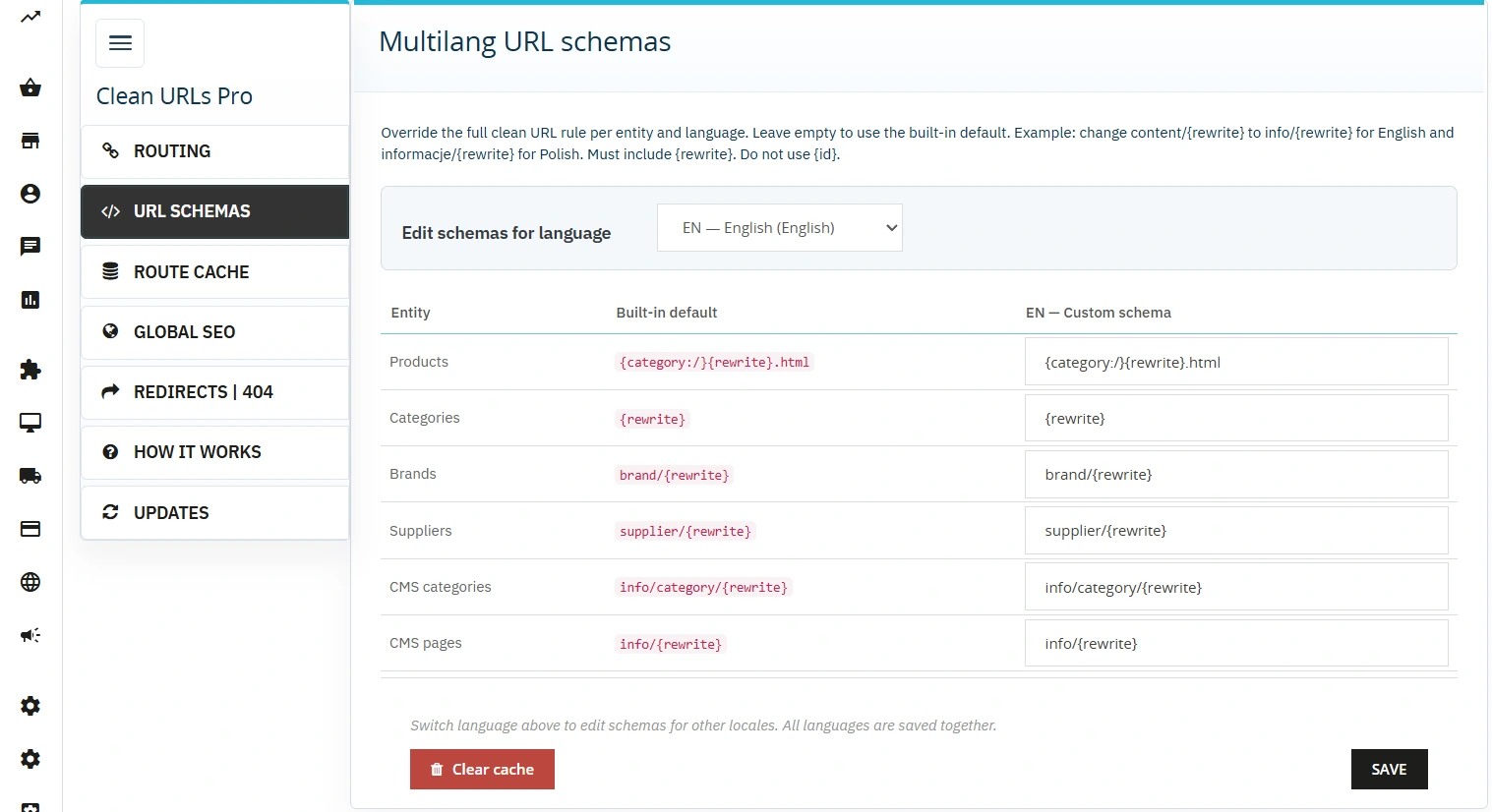
- Multilingual setups – independent URL schema definitions per language (e.g.
info/{rewrite}for EN andinformacje/{rewrite}for PL). - Multistore environments – full support for independent No-ID toggles and URL route schemas configured per shop instance or shop group.
- High-concurrency stores – native Redis/Memcached integration for route caching to drastically reduce DB read load.
- SEO auditing & troubleshooting – built-in 404 error logger with a hit counter and an explicit one-click 301 mapping tool accelerates index health management.
Features – Back Office Panel
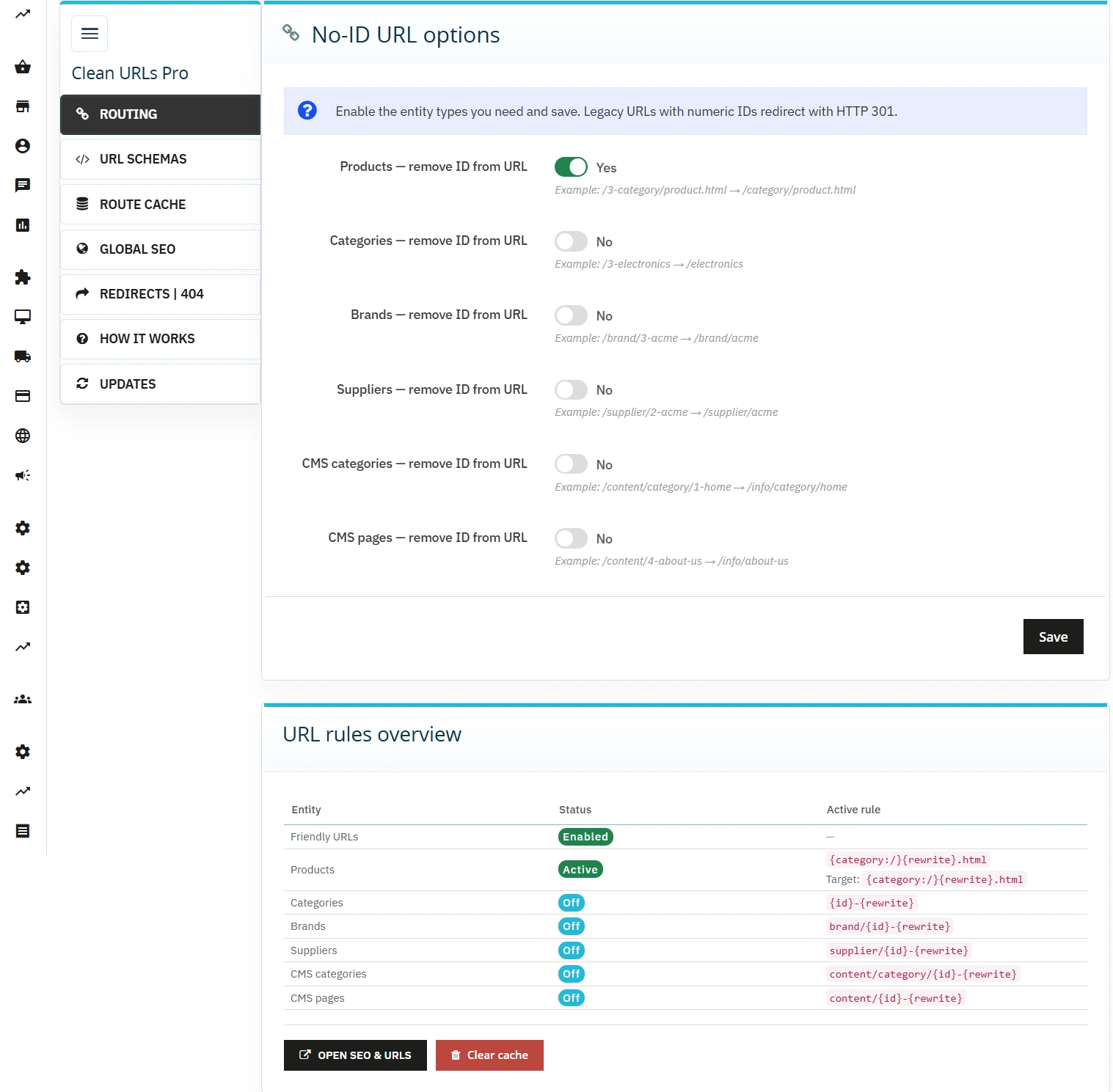
Per-entity No-ID toggles
Independent routing control for products, categories, CMS pages, CMS categories, brands, and suppliers — isolating configuration changes to specific entities.
URL conflict validator
Real-time duplicate slug and path collision scanning upon loading the Routing tab and during execution; saves are hard-blocked if an ambiguous route risk is detected.
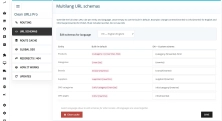
Multilingual route schemas
Define custom URL path prefixes per entity and language locale; leaving the input blank safely falls back to the native PrestaShop defaults.
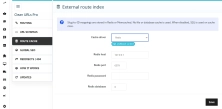
Route indexing – Redis / Memcached / SQL
Slug-to-ID key-value mappings are stored in the designated cache engine; if the connection drops, the module smoothly executes an automated fallback to SQL queries without service interruption.
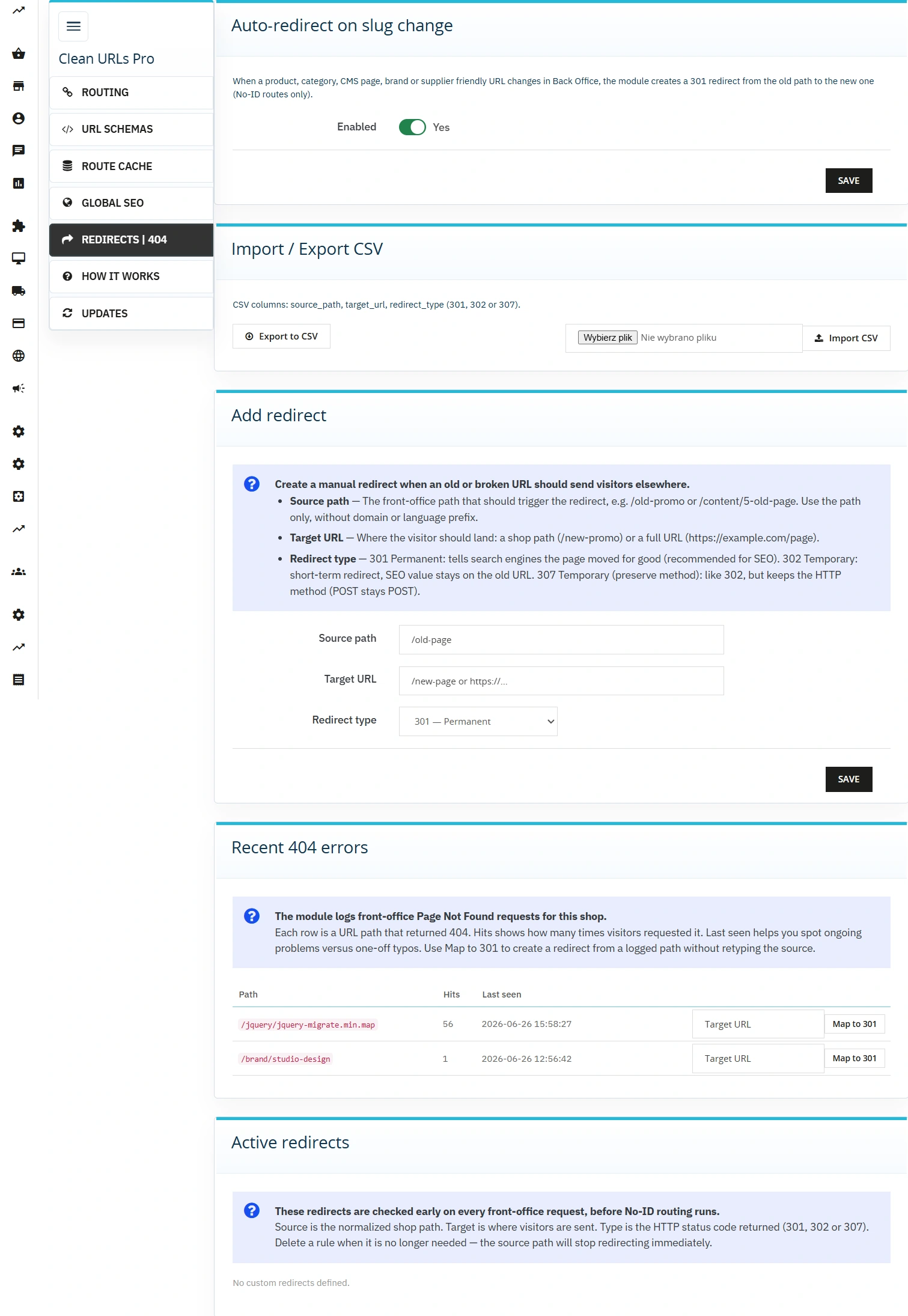
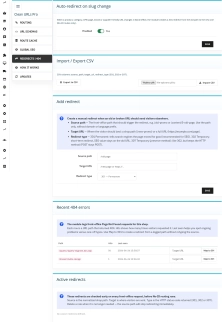
Redirect manager
Manual management of 301/302/307 routing rules combined with automated triggers on slug modification — any friendly URL update instantly hooks a redirect record.
CSV redirect import / export
Bulk data processing of redirect tables via CSV files — designed for major migrations, information architecture overhauls, or syncs between staging and production.
404 error logger
Aggregated table of unresolved request paths including an exact hit counter; allows immediate 301 mapping directly from the log entry interface.
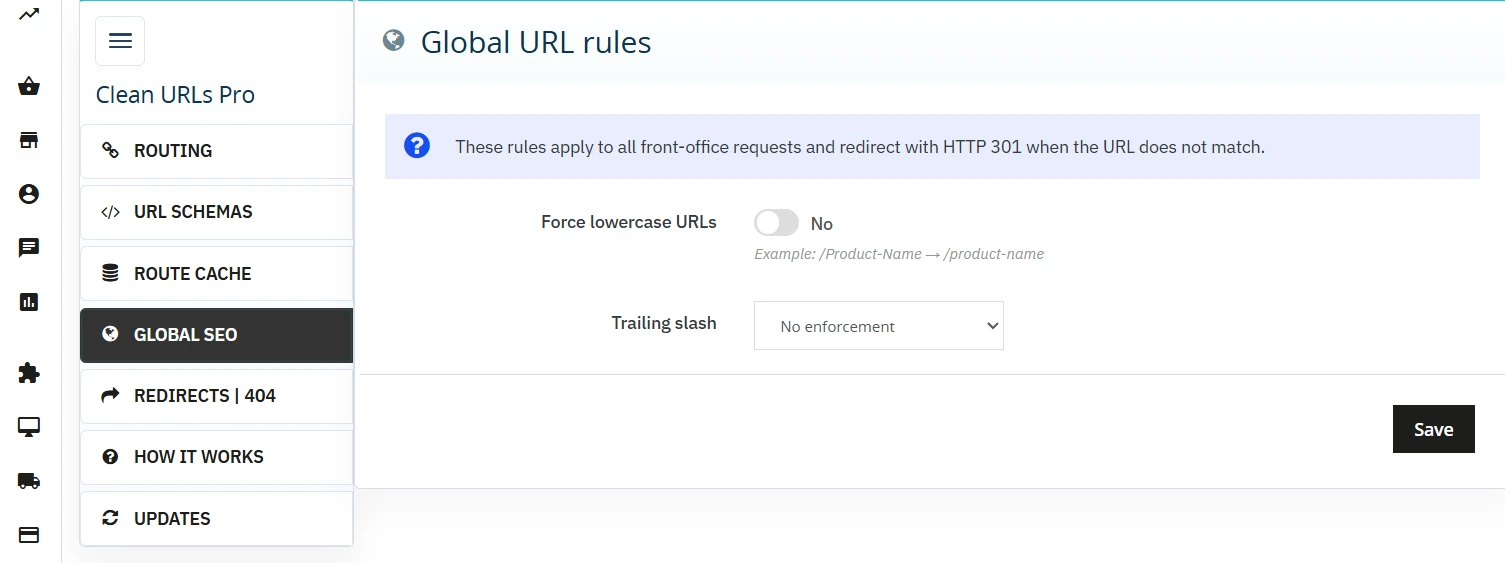
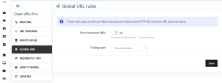
Global SEO normalisation
Enforce lowercase URLs and strict trailing slash policies (forced stripping or appending) globally, independent of individual No-ID entity states.
Routing lookup & diagnostics
Dedicated status dashboard exposing the current PS_ROUTE_* state per entity (Disabled / Active / Save Required) paired with an instant cache-flush trigger.
Multistore context isolation
No-ID switches and PS_ROUTE_* parameters are scoped to the selected multistore context. The active context is explicitly exposed above the form to prevent accidental global overrides.
PP Updater
Integrated deployment module to check, validate, and pull core module updates directly from the Back Office environment.
SEO & Performance Impact
- Streamined URL structures accelerate crawl budget efficiency — search engine spiders parse and index the catalog faster due to the elimination of redundant path tokens.
- Clean, semantic URLs significantly boost CTR in organic SERPs and increase user trust at the pre-click stage.
- Automated 301 triggers on rewrite changes preserve historical link juice and eliminate the risk of 404 spikes during catalog updates.
- Forced lowercase transformations and explicit trailing slash handling enforce strict URL canonicalisation, preventing duplicate content penalties in search indexes.
- The 404 monitoring log exposes high-traffic broken paths, enabling rapid hotfixes without relying on third-party analytics software or heavy log parsers.
Deployment Notes
Critical: Take a full database and filesystem snapshot prior to installation and No-ID initialization. Ensure that Friendly URLs are globally compiled in the engine (Configure > Shop Parameters > Traffic & SEO). Compatibility targets: PrestaShop 8.1 – 9.x and PHP 8.1 – 8.5. Review the Routing diagnostics tab for existing slug duplicates before toggling production states — saving with an active collision will be rejected by the validation engine.
# Changelog – Clean URLs Pro

## [1.2.1] - 2026-07-21

### Fixed

- Categories No-ID (`{rewrite}`): homepage `/`

---

## [1.2.0] - 2026-07-16

### Changed

- **PrestaShop 9.x only** — dropped support for PrestaShop 8.x (`ps_versions_compliancy`: 9.0.0 – 9.99.99)
- **PHP 8.1 – 8.5** enforced in module (`composer.json`: `>=8.1.0 <8.6.0`) and at runtime
- Install / enable / configuration / front hooks are blocked outside the supported environment

### Requirements

- PrestaShop **9.0.0 – 9.x**
- PHP **8.1 – 8.5**
- Friendly URLs enabled

---

## [1.1.2] - 2026-06-26

### Fixed

- Conflict validation: improved slug collision detection for Multistore contexts
- Cache layer: Redis fallback now properly handles connection timeouts
- 404 Logger: fixed timestamp display in CSV export
- URL Schema Panel: removed unnecessary POST validation for GET requests

### Changed

- Performance: optimized query count for route index invalidation
- Admin UI: "How it works" panel now displays URL schema examples with tooltips
- Documentation: updated link rewrite index installation instructions

---

## [1.1.1] - 2026-06-20

### Added

- Import/Export CSV for redirects with batch operations (up to 1000 rows per file)
- Route cache statistics dashboard showing hit/miss ratio per entity type
- New alert types: info, warning, error with distinct visual styling

### Fixed

- Multistore: fixed issue where group context wasn't properly isolated
- Globalne SEO rules no longer apply to admin URLs
- Schema validation: fixed regex pattern for URL placeholders

### Changed

- Improved performance: cached route definitions now use lazy loading
- Admin redirect manager now shows last modification date
- Simplified 404 logger interface with inline quick-fix buttons

---

## [1.1.0] - 2026-06-15

### Added

- **External Route Index**: Redis and Memcached support for high-traffic shops (fallback to SQL)
- **Global SEO Rules tab**: enforce lowercase URLs and trailing slash policy
- **Redirects | 404 tab**: comprehensive redirect manager with 404 logger and quick-fix interface
- **URL Schemas tab**: multilingual, per-entity URL pattern customization with live preview
- Automatic redirect (HTTP 301) on slug changes for products and categories
- Slug change tracking system that triggers redirects after entity updates

### Fixed

- URL validation now checks for path collisions across different entity types
- Category and Product URL conflicts properly detected in validation scan

### Changed

- Requires PrestaShop 8.1+ (updated from 8.0+)
- Route caching is now mandatory for No-ID to function
- Admin tab icon redesigned for better visibility

### Deprecated

- Direct database URL queries (now use RouteIndex abstraction layer)

---

## [1.0.5] - 2026-06-08

### Added

- Multistore support: independent No-ID switches and PS_ROUTE_* schemas per shop/group
- Context indicator displayed above configuration form
- Store context selector in Admin tab header

### Fixed

- Conflict validation now respects shop context properly
- No-ID switches no longer affect other stores when configured per-shop

### Changed

- Configuration panel now displays active shop/group context
- Validation alerts now include shop ID for clarity

---

## [1.0.0] - 2026-05-01

### Added

### Requirements

- PrestaShop 8.1.0 – 9.x
- PHP 8.1 – 8.5
- Friendly URLs enabled
You might also like


FAQs
-
Which URL types can Clean URLs Pro simplify?
The module can independently remove IDs from product, category, CMS page, CMS category, brand and supplier URLs. Each entity type is enabled with its own switch, so changing routing for one area does not have to affect the other parts of the shop.
-
Are the modules compatible with my version of PrestaShop?
Each module in our store contains information about compatibility with specific PrestaShop versions. Please check this information carefully before purchasing. If you are not sure, contact us.
-
How are redirects created after a friendly URL changes?
According to the product description, changing the URL rewrite field of a product or category automatically registers a redirect rule in the database. This allows the module to create 301 redirects without manual administrator intervention, so the old URL leads to the current path.
-
Can I use different route patterns for each language?
Yes. The configuration lets you define a custom path prefix for each entity and language version. If the field is left empty, the module safely falls back to the default PrestaShop pattern. This makes it possible to use different route naming across locales.
-
How does the module handle the routing index?
Slug-to-ID mappings can be stored in the selected Redis or Memcached caching mechanism. If the connection to that mechanism is unavailable, the product description provides for a fallback to native SQL queries without interrupting the shop page.
-
What tools does the redirect manager provide?
The redirect manager supports manual HTTP 301, 302 and 307 rules. The product also describes CSV import and export of rules, making it possible to manage a larger number of redirects during a migration, information-architecture redesign or environment synchronisation.
16 other products in the same category:

Custom HTML Descriptions and SEO Optimisation for PrestaShop Promo, Best Sellers and New...
The default PrestaShop configuration does not allow entering custom texts or graphics on key subpages that generate organic search traffic. The ppcorepagesseo module is a...

SEO Custom Code Manager for PrestaShop Products Categories and CMS
A module for PrestaShop that allows adding custom JSON-LD , JavaScript, and CSS resources individually to each product, category and CMS . Increase search engine...
Extra Product Tabs – Tab Creator, CSV Import and SEO
Transform chaotic descriptions into a professional offer that sells! The Extra Product Tabs module allows you to instantly add unlimited tabs (e.g. Size Guide, Video,...

- Discount
Price available only until: 11.10.2026
Product recommendation module for PrestaShop
A recommendations module for PrestaShop that displays tailored product suggestions in two key points of the buying journey: the product page and the cart. It reduces...

Advanced PrestaShop traffic and performance optimization generator (htaccess)
Stack Pro is a protective module for PrestaShop that restricts artificial and automated traffic at the server level through controlled modification of the .htaccess file....

- New
Free Simple Omnibus Price Module – Omnibus Directive for PrestaShop
Simple Omnibus Price is a completely free PrestaShop module that automates displaying the lowest price from the 30 days prior to a price reduction. Protect your store...

Remove ID from URLs (CMS, Brands) PrestaShop [Free]
The free Clean URLs Lite module modifies native PrestaShop routing by removing numeric identifiers (IDs) from CMS page, CMS category, and brand (manufacturer) URLs. It...

Increase the long product description and image ALT text limit in PrestaShop 8/9
PP Limit Manager removes the length restriction applied to the long product description and product image ALT text in the new PrestaShop 8 and 9 product form. The module...

PrestaShop Promotion Module: Free Gifts, Quantity Discounts, Buy X Get Y and Category Offers
The PP Promo module for PrestaShop makes it easy to create and automate popular sales campaigns, from "Buy 2, Pay for 1" offers and free gifts to discounts on selected...
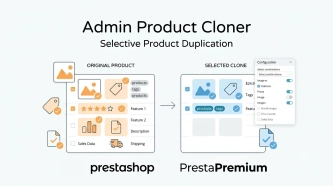
Admin Product Cloner – Selective Product Duplication
Admin Product Cloner is a simple, handy tool for PrestaShop administrators, designed to streamline daily catalogue management. The module replaces the standard, full...

Google Maps Reviews Module for PrestaShop – Automatic Import and Display of Customer Ratings
This module serves to increase trust in your shop by displaying authentic reviews from Google Maps. Thanks to the automatic generation of JSON-LD structured data, star...

Store Auditor — 25 Configuration Checks for Your PrestaShop Back Office
Store Auditor is a completely free PrestaShop module that checks 25 core settings of your store with a single click. It instantly lets you know if your website is...

- New
Hreflang and X-Default Normalisation for PrestaShop
Hreflang Pro solves the issue of directing shoppers to the wrong language version of your store (for instance, when a local customer lands on a foreign-language page from...

Automatic currency matching by shop language in PrestaShop
PP Smart Currency automatically matches the currency to the language a customer is using in your PrestaShop store. Visitors immediately see the right currency, while the...

PrestaShop Schema Pro - Rich Snippets & SEO Booster
Rich Results + AI = dominate search results and increase sales in PrestaShop! Automatic JSON-LD generator with full support for more than 15 Schema.org types, including...
SEO Scanner - fast SEO auditing for products, categories and CMS pages in PrestaShop
PP SEO Scanner is an efficient diagnostic tool for PrestaShop, designed to automate on-site SEO auditing. The module analyses products, categories and CMS pages for...
Do you need additional features or custom solutions?
- Module customisation tailored to your specific requirements.
- Extending functionality to enhance your store's capabilities.
- Developing bespoke modules designed to meet your unique needs.
- Integrating external systems and additional tools.
- Optimisation and improvements for better performance and user experience.
Do you have ideas on how to improve this software? Share your suggestions for optimisation, new features, or bug reports – we’ll be happy to review them!