Unused Product Images — Free Server Cleanup for PrestaShop
- 8.x | 9.x
- PL, EN
- 1.0.0
- 2026-06-22
Unused Product Images (Free) is a free PrestaShop module designed to optimize disk space and file limits (Inodes) on your hosting. The tool automatically locates and displays image files and thumbnails that remain on the server but are no longer associated with any product in the database.
The module directly solves the issue of slow-running backups and simplifies store migration. Scanning and deletion are performed asynchronously (AJAX) from the administration panel, preventing server overload even with hundreds of thousands of images left behind by mass imports or years of testing.

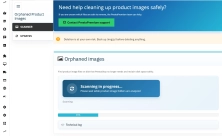
Information Parameters:
- 1.0.0
-
Store Version PHP Version8.x 8.1 – 8.39.x 8.1 – 8.5
- 2026-06-22
- PL, EN
- ✅
- ✅
- ✅
- ✅
Key Benefits
- Faster backups and secure migration — reduced file size drastically cuts down backup creation time and facilitates quick store restoration in case of emergency.
- Protection against hosting limits (Inodes) — removing unnecessary graphics frees up the total number of files on the server, preventing critical account suspension.
- Real cost savings — reclaiming disk space helps avoid forced upgrades to more expensive hosting plans.
- Streamlined development work — a lightweight directory downloads to your local or staging environment in minutes instead of hours, reducing technical service costs.
- Full control before deletion — see the exact number of files and total data size to be recovered; the final decision always remains yours.
Use Cases
- Server cleanup after migration or mass product imports (XML/CSV) — removing remnants of old files.
- Cleaning the production environment after chaotic testing or deleted catalogs.
- Post-thumbnail regeneration cleanup — removing deprecated image formats no longer used by the active theme.
- Quick audit and space reclamation on smaller, limited shared hosting environments.
- Routine technical maintenance without the need for slow FTP directory browsing.
Features – Back Office
File Scanner
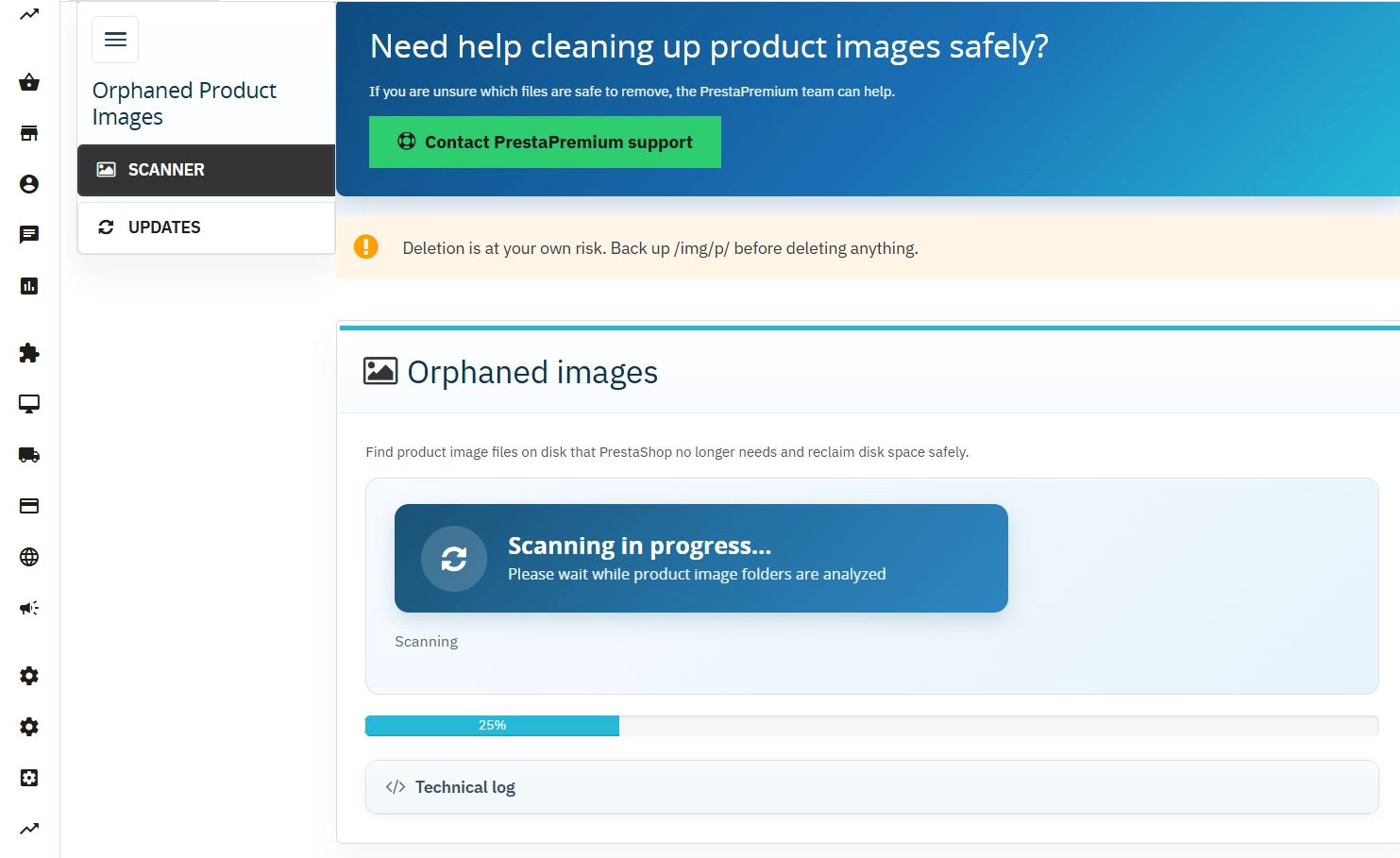
A single-click process that compares disk contents directly with the PrestaShop database.
- Live progress bar — real-time percentage tracking during the scan.
- Key metrics — instant details on the number of files to delete and the volume of MB/GB to reclaim.
Batch Deletion
Safe server space cleanup without the risk of overloading server infrastructure.
- Batches of 100 files — eliminates the risk of operation timeouts or server freezes.
- Resume option — allows continuing the process in case of temporary network drops.
Technical Log
A concise reporting panel displayed directly within the module configuration screen.
- Success status — clear confirmation upon successful cleanup completion.
- Error handling — straightforward troubleshooting (e.g., incorrect write permissions/CHMOD on the server).
Lightweight Architecture
Engineered to keep the system clean and performant.
- No extra database tables — the module introduces zero overhead to the store database.
- Compatibility & Updates — full support for PrestaShop from 1.7.7 up to the latest 9.x releases, featuring the built-in PP Updater.
Features – Front Office
The module operates exclusively on the administrative backend. It has no Front Office features — it does not modify the theme, loads no additional JS/CSS scripts, and has zero impact on page load speeds for your customers.
Impact on Stability and SEO
- Safe for SEO — the module only removes files with no matching database records. Images of active products are untouched, and their Google indexing remains completely secure.
- Smoother server management — getting rid of hundreds of thousands of redundant files speeds up core file operations (e.g., loading directories via FTP clients or executing SSH commands).
Important Note!
Before clicking Delete found files, you must perform a backup of the /img/p/ directory. The deletion process is irreversible, and the module does not create backups automatically. The scan relies on the standard PrestaShop image structure — if you use external, custom integrations that save files under unique naming conventions, please review the generated list manually before executing the cleanup.
## [1.0.0] - 2026-06-22

### Added
You might also like



FAQs
-
How does the module identify unused product images?
The module compares the contents of the disk with the data stored in the PrestaShop database. Start a scan with one click and follow its progress on the progress bar. When it finishes, you receive the number of files marked for removal and the amount of disk space that can be recovered.
-
Are the modules compatible with my version of PrestaShop?
Each module in our store contains information about compatibility with specific PrestaShop versions. Please check this information carefully before purchasing. If you are not sure, contact us.
-
Can I check how much space can be recovered before cleaning?
Yes. Before you decide to delete files, the module shows the exact number of images found and their total size. This lets you assess the potential server-space recovery and decide whether to start the cleanup process.
-
Why are images deleted in batches?
The module removes files in batches of 100 items. This approach helps reduce the risk of infrastructure overload and timeout errors during larger operations. If a temporary connection issue occurs, you can continue the process that has already started.
-
Does the module add anything to the storefront?
No. The tool operates exclusively in the PrestaShop Back Office. According to its description, it does not modify the theme, load additional JavaScript or CSS files, or add features visible to store customers.
-
What should I do before deleting the files found?
Before using the removal function, create a backup of the
/img/p/directory. Deleting data from disk is irreversible, and the module does not create backups automatically. For custom integrations that store their own files, it is also worth reviewing the generated list manually.
16 other products in the same category:
- Discount
Price available only until: 25.09.2026
Extra Product Tabs – Tab Creator, CSV Import and SEO
Transform chaotic descriptions into a professional offer that sells! The Extra Product Tabs module allows you to instantly add unlimited tabs (e.g. Size Guide, Video,...

- Discount
Price available only until: 30.09.2026
PrestaShop Product Reviews & Comments – Discount Vouchers, Customer Photos, JSON-LD & Fee-Free...
This module serves as a complete alternative to paid SaaS review platforms (such as Trustpilot, Opineo, or Trusted Shops) and allows you to bypass complex Google...

PrestaShop Schema Pro - Rich Snippets & SEO Booster
Rich Results + AI = dominate search results and increase sales in PrestaShop! Automatic JSON-LD generator with full support for more than 15 Schema.org types, including...

Custom HTML Descriptions and SEO Optimisation for PrestaShop Promo, Best Sellers and New...
The default PrestaShop configuration does not allow entering custom texts or graphics on key subpages that generate organic search traffic. The ppcorepagesseo module is a...

- Discount
Price available only until: 11.10.2026
Product recommendation module for PrestaShop
A recommendations module for PrestaShop that displays tailored product suggestions in two key points of the buying journey: the product page and the cart. It reduces...
Store Auditor — 25 Configuration Checks for Your PrestaShop Back Office
Store Auditor is a completely free PrestaShop module that checks 25 core settings of your store with a single click. It instantly lets you know if your website is...

Smart Image Optimiser — Lossless Quality and Perfect PrestaShop Product Images
Smart Image Optimizer is an advanced tool that effectively eliminates the problem of automatic, lossy recompression of graphics files by PrestaShop's engines (GD/Imagick)....
Increase the long product description and image ALT text limit in PrestaShop 8/9
PP Limit Manager removes the length restriction applied to the long product description and product image ALT text in the new PrestaShop 8 and 9 product form. The module...

Google Maps Reviews Module for PrestaShop – Automatic Import and Display of Customer Ratings
This module serves to increase trust in your shop by displaying authentic reviews from Google Maps. Thanks to the automatic generation of JSON-LD structured data, star...
Clean URLs Pro – remove IDs from PrestaShop URLs
Clean URLs Pro removes numerical IDs from product, category, CMS category, CMS page, brand, and supplier URLs — without core modifications and with zero overrides. Simply...
Automatic currency matching by shop language in PrestaShop
PP Smart Currency automatically matches the currency to the language a customer is using in your PrestaShop store. Visitors immediately see the right currency, while the...

- New
Hreflang and X-Default Normalisation for PrestaShop
Hreflang Pro solves the issue of directing shoppers to the wrong language version of your store (for instance, when a local customer lands on a foreign-language page from...
Error Radar & Toolbox — PrestaShop Error Diagnosis & Server Utilities
Error Radar & Toolbox is a powerful, free administrative module for PrestaShop that allows you to instantly diagnose technical store issues directly from your Back...
Remove ID from URLs (CMS, Brands) PrestaShop [Free]
The free Clean URLs Lite module modifies native PrestaShop routing by removing numeric identifiers (IDs) from CMS page, CMS category, and brand (manufacturer) URLs. It...

Advanced Search for PrestaShop
Advanced product search for PrestaShop that helps customers find the right products faster and makes it easier to complete purchases in your PrestaShop store . The module...
SEO Scanner - fast SEO auditing for products, categories and CMS pages in PrestaShop
PP SEO Scanner is an efficient diagnostic tool for PrestaShop, designed to automate on-site SEO auditing. The module analyses products, categories and CMS pages for...
Do you need additional features or custom solutions?
- Module customisation tailored to your specific requirements.
- Extending functionality to enhance your store's capabilities.
- Developing bespoke modules designed to meet your unique needs.
- Integrating external systems and additional tools.
- Optimisation and improvements for better performance and user experience.
Do you have ideas on how to improve this software? Share your suggestions for optimisation, new features, or bug reports – we’ll be happy to review them!