Product recommendation module for PrestaShop

1.7.x, 8.x
EN, FR, IT, DE, PL
  • 1.1.2
  • 2025-12-25
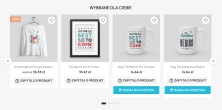
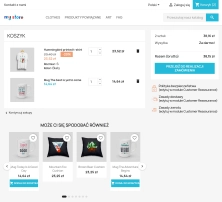
  • A recommendations module for PrestaShop that displays tailored product suggestions in two key points of the buying journey: the product page and the cart. It reduces drop‑offs and helps close sales without rebuilding the theme.

    Designed for sales, admins, developers and SEO: it gives you control over exposure, keeps recommendations “add‑to‑cart ready”, and maintains a consistent content layout.

    Price available only until: 25.01.2026

    512.82 zł Tax excluded
    666.00 zł
    Save 23%
    Lowest price within 30 days before promotion: 512.82 zł

    Enter domain for this product

    event Important: Domain change possibility expand_more

    If the module will be tested, enter a test domain during purchase.

    You will report the change to a production domain later.

    In case of an incorrectly entered domain, please contact us as well.

    Changing the domain to a production one is possible once and requires reporting within 3 days of starting its use.

    Reports: shop@prestapremium.com

    In the content, provide:

    • order number
    • product name
    • current domain
    • new domain

    Details

    shopping_cart Will be added to cart 1 pieces of this product (one for each domain)

    Store Administration Back office demo
    What will your clients see? Store demo

    Information Parameters:

    • 1.1.2
    • 2025-12-25
    • 1.7.x, 8.x
    • EN, FR, IT, DE, PL
    • demo.admin.shop
    • demo.front.shop

    What the module does and why it’s worth it

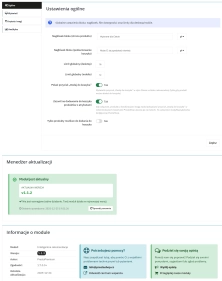
    • One controlled place for recommendations – a consistent block on the product page and in the cart (instead of scattered suggestions).
    • Rules‑based selection – recommendations come from criteria, weights and limits, not from manual “gut feel”.
    • Add‑to‑cart under control – the “Add to cart” options and the “add‑to‑cart ready only” filter reduce frustration and dead clicks.
    • Scales with low operational effort – results are cached and refreshed after product changes.
    • No theme conflicts – the carousel can use Slick, but you can disable loading the library if your theme already includes it.

    Use cases

    • Shops with large catalogues where fast product prompting is key, without manual curation.
    • Industries with complementary purchases (e.g. accessories), where effective cross‑sell and “bought together” matters.
    • Shops running promotions and sales that want to highlight discounted products in a logical context.
    • Shops (B2B/B2C) that require consistent presentation on mobile and desktop.

    Features – Back Office

    1. Block headings

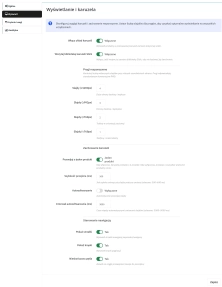
    You set what the recommendations section is called in two places.

    • Separate heading for the product page and the cart.
    • Multilingual – headings depend on the shop language.
    • Fallback – when left empty, the module will use the default text.

    2. Display limits (desktop/mobile + per criterion)

    You control the number of products so the block stays effective and doesn’t overload the page.

    • Global limit separately for desktop and mobile.
    • Per‑criterion limit – each recommendation source has its own cap so it won’t dominate the result.

    3. Add to cart & eligibility (one consistent logic)

    You define when a product can be added to the cart and whether non‑purchasable products should be hidden.

    • Enable “Add to cart” + validation – the button appears only when the product meets the conditions for purchase.
    • Filter “purchasable only” – optionally removes recommended products that cannot be added to the cart.
    • Products with attributes – allows showing “Add to cart” for products that have variants.

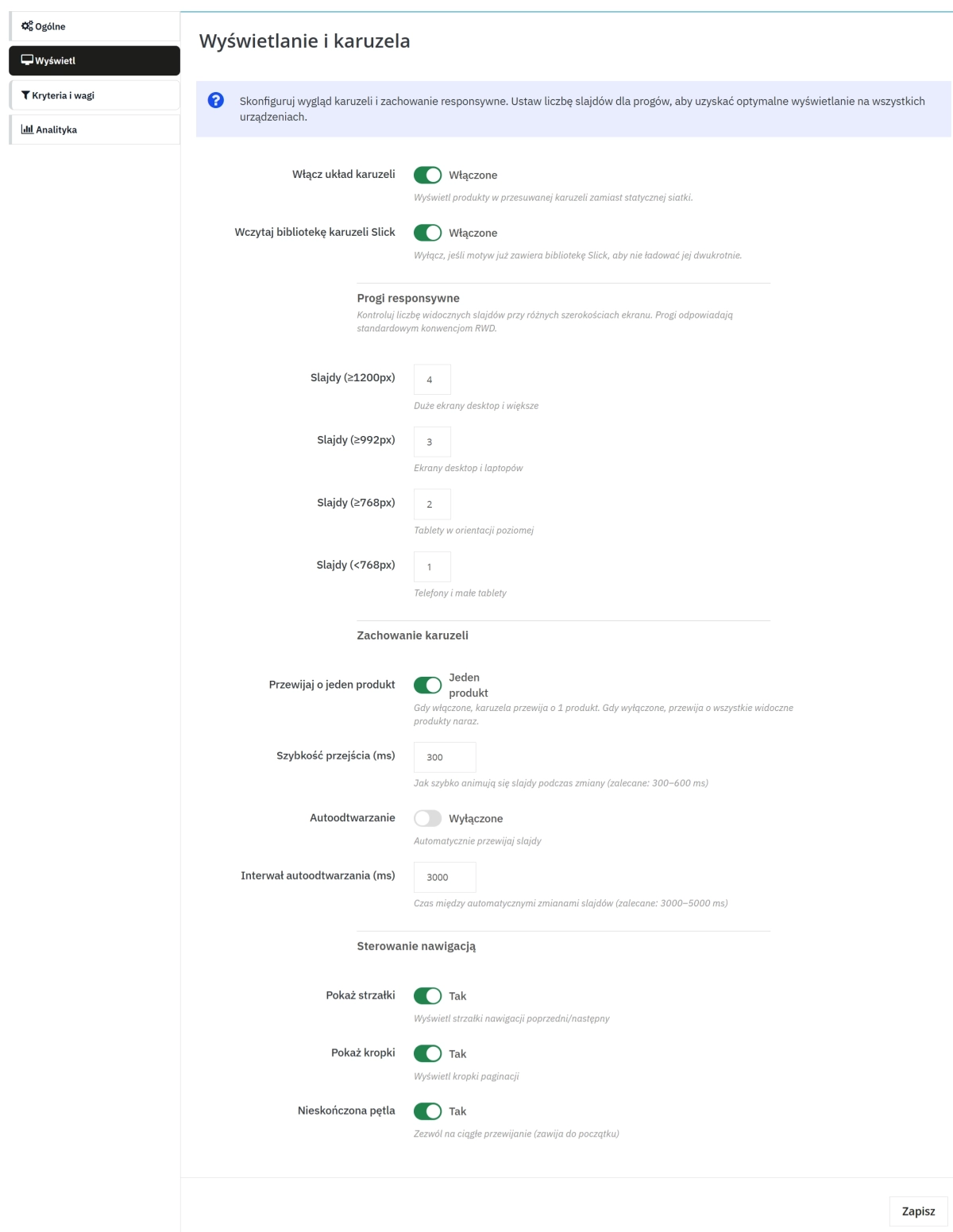
    4. Block layout: grid or carousel (Slick)

    You choose UX to fit your catalogue: quick scanning in a grid or browsing by scrolling in a carousel.

    • Grid mode or carousel mode – without changing the theme (Classic theme compatible).
    • Slick – the module can load the library or only initialise it (when the theme already includes Slick).
    • Responsive – breakpoints and the number of visible products.
    • Carousel behaviour – autoplay, speed, arrows/pagination, loop, scrolling.

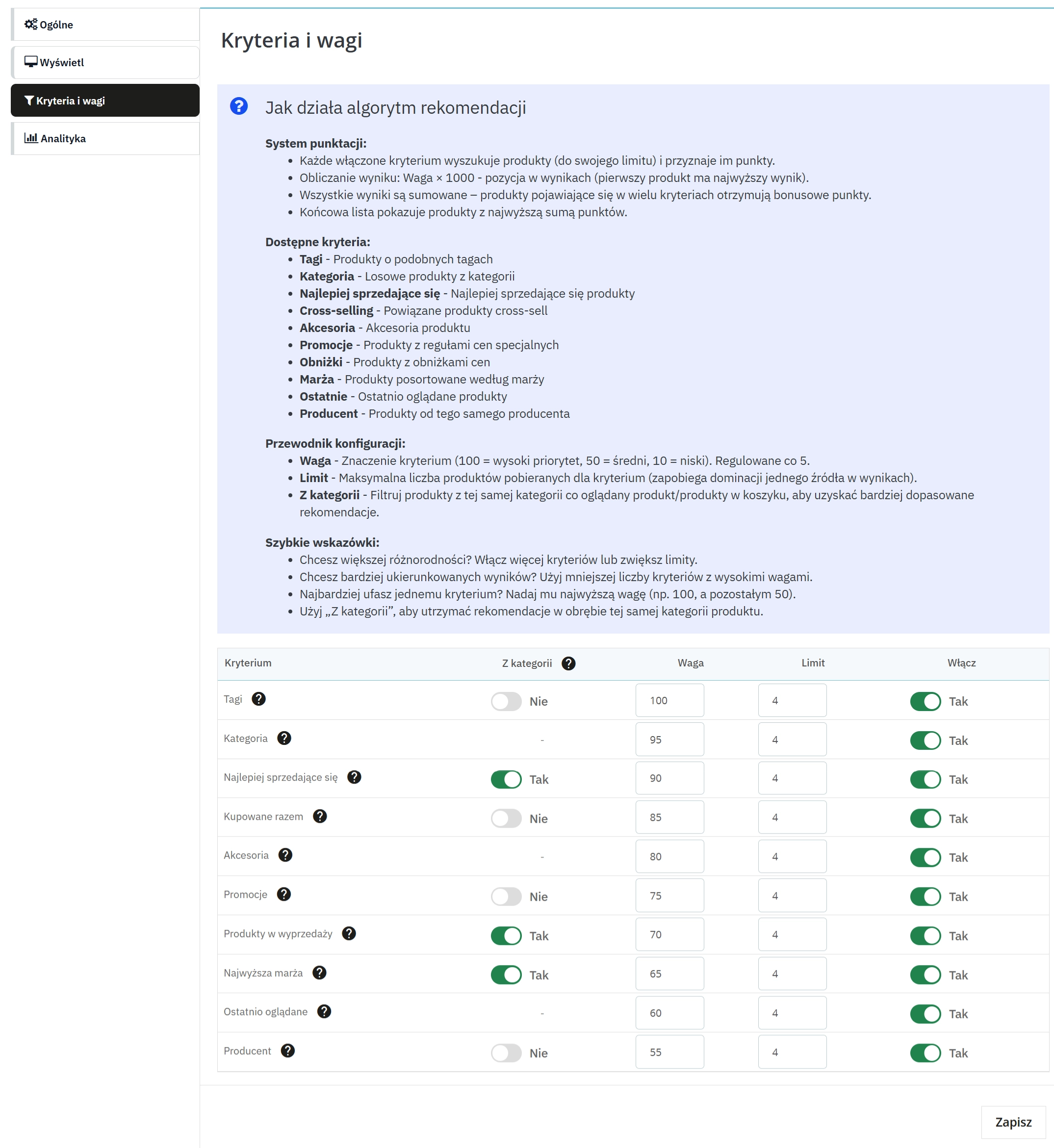
    5. Recommendation criteria (10) + weights/limits + “From category”

    You build your selection logic: choose recommendation sources and set how strongly they affect the final result.

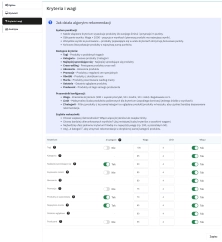
    • 10 criteria : tags, category, best sellers, bought together, accessories, promotions, on sale, margin, recently viewed, manufacturer.
    • Enable / Weight / Limit for each criterion.
    • “From category” (where available) – restricts to the context category: product (product category) / cart (categories of products in the cart).

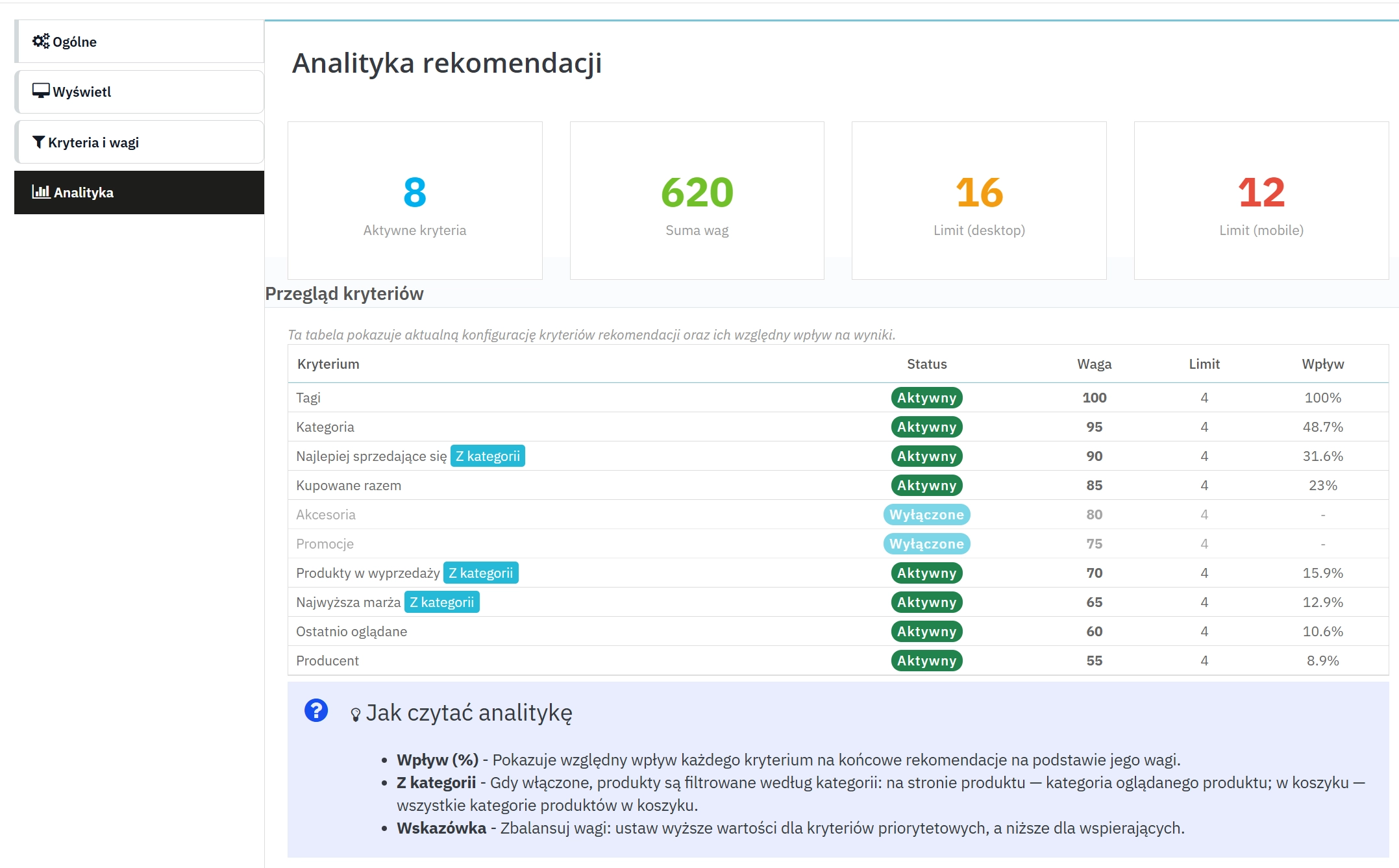
    6. Configuration analytics

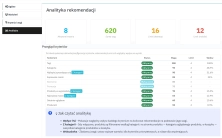
    You quickly verify how the current settings distribute emphasis between criteria.

    • Overview of active criteria and their parameters.
    • Influence % – percentage share of a criterion’s weight within the sum of weights of active criteria.
    • Limits summary for desktop/mobile.

    7. Cache, refresh and updates

    The block stays fast and keeps itself up to date after catalogue changes.

    • Cache separately for the product page and the cart.
    • Automatic cache clearing after product add/edit/delete.
    • PPUpdater – update availability information in the module panel.

    Features – Front Office

    1. Where the block is displayed

    Recommendations appear where customers most often make the purchase decision.

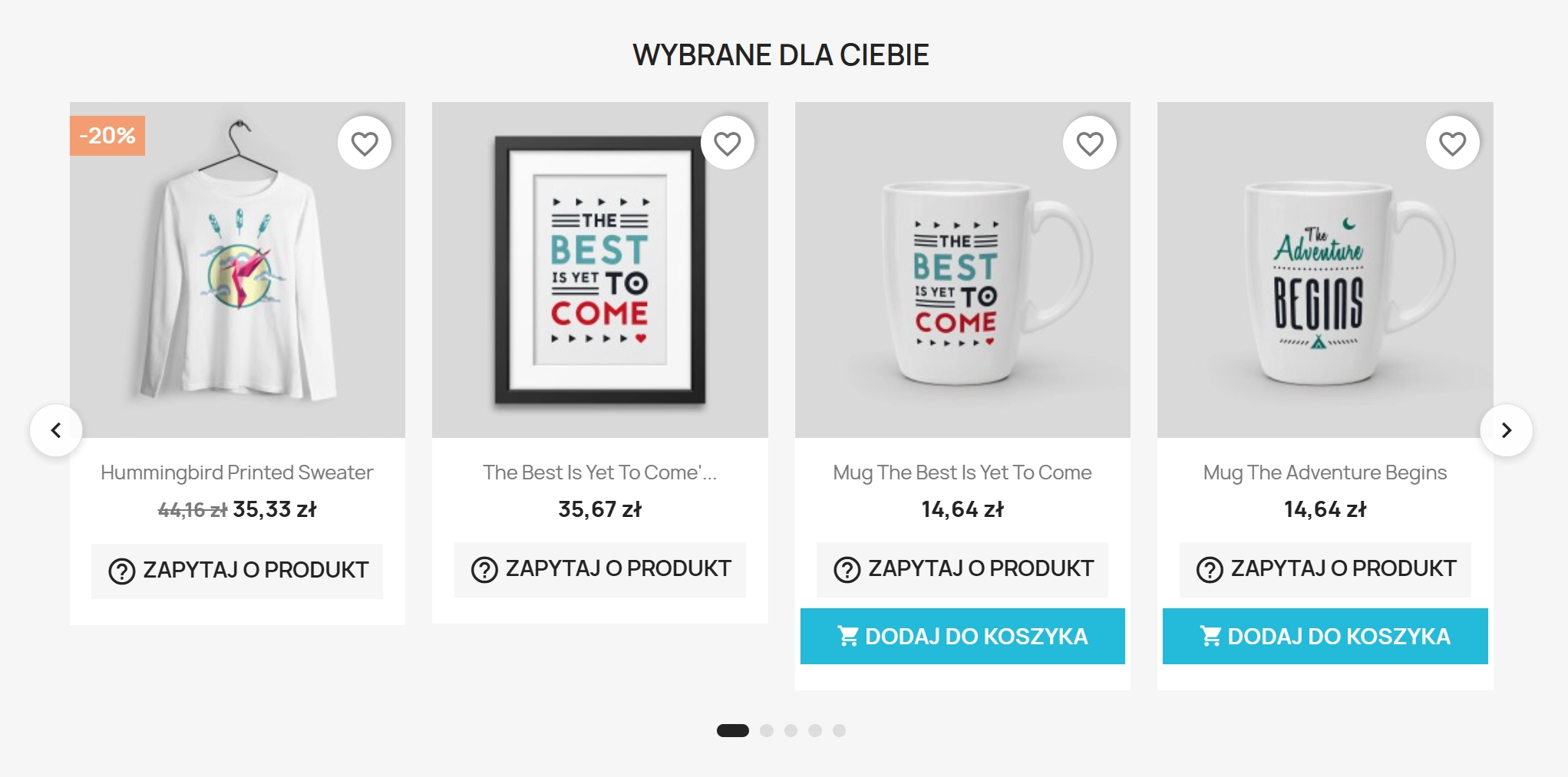
    • Product page – recommendations in the context of the currently viewed item.
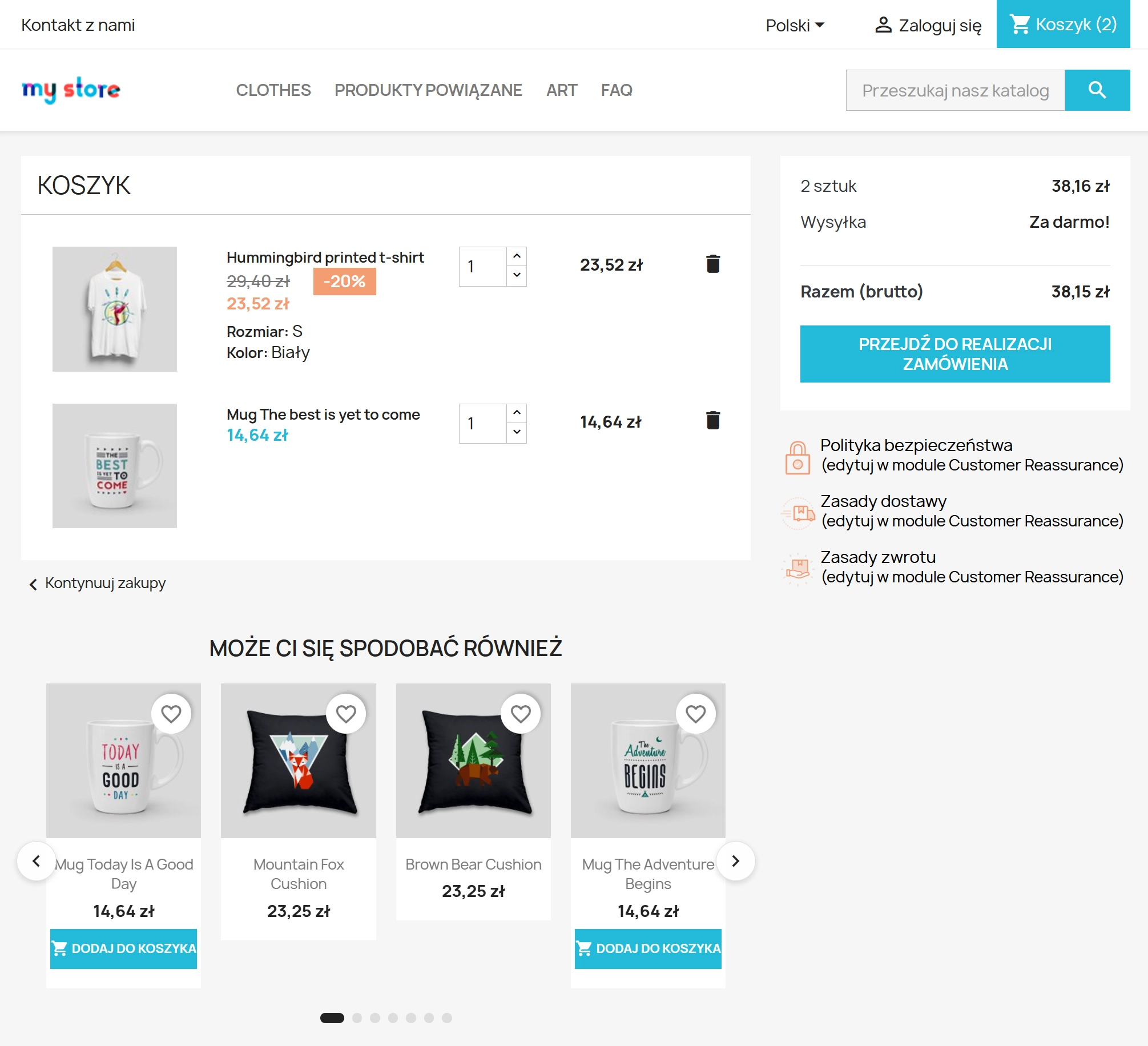
    • Cart – suggestions just before checkout.

    2. Theme‑consistent look

    The module doesn’t force its own widget – it uses the standard product presentation.

    • Product miniatures rendered in the theme’s standard structure (consistent UI).
    • Heading comes from configuration – separately for the product page and the cart.

    3. Grid or carousel (Slick)

    The same set of products can be displayed as a grid or as a carousel – depending on configuration.

    • Grid – quick scanning of multiple products.
    • Slick carousel – scrolling and configurable responsive behaviour.

    4. “Add to cart” (recommendations + listing)

    The module can shorten the path to purchase, but only where adding to cart is genuinely possible.

    • Button in recommendations – if enabled in configuration.
    • Button on listings – the module can inject “Add to cart” into product lists.
    • No dead clicks – the button is displayed only for products that meet add‑to‑cart conditions.
    • “Add‑to‑cart ready only” option – further restricts recommendations to products that can be purchased.

    Automation and operating logic

    • Recommendations are built from active criteria and configured weights and limits.
    • The same product may appear in several criteria – its score is combined and it rises in the ranking in a stable way.
    • Depending on settings, the module checks add‑to‑cart eligibility (for the button and/or filtering the list).
    • The whole block is cached and refreshed automatically after product changes.

    Impact on sales and SEO

    • More items in the cart – extra exposure in the cart increases the chance of adding complementary items.
    • Fewer “dead clicks” – the “add‑to‑cart ready only” option reduces cases where the customer can’t add the suggested product.
    • Stable content section – recommendations create a repeatable block of content on high‑value SEO pages (product/cart).
    • Better exposure control – weights and limits let you test layouts and compare effects in shop analytics.

    Who is this module for?

    • Sales teams – to organise cross‑sell and increase basket value without manually arranging lists.
    • Administrators – for safe recommendation configuration, availability control and easy maintenance.
    • PrestaShop developers – for deployments that require predictable behaviour, caching and minimal theme conflicts.
    • SEO specialists – to build consistent content sections on key pages and support offer visibility.

    Summary and CTA

    If you want to deploy recommendations based on clear rules and keep control over what customers see on the product page and in the cart, configure PPSmartRecommendations and set criteria to match your catalogue.

    Call to action: Install the module and start configuring criteria and limits to match your sales goals.

    Alert

    Before installation or upgrade, back up your files and database. If your theme already loads Slick, disable the module option that loads the library to avoid conflicts and duplicate assets. After configuration changes, verify the appearance on mobile and desktop.

    ## [1.1.2] - 2025-12-25
    
    ### Added
    
    - **Separate headings per context**: introduced two independent, multi-language block headings:
      - `PPSMARTREC_HEADING_PRODUCT` (product page)
      - `PPSMARTREC_HEADING_CART` (cart summary)
    - **Translation-ready defaults**: default heading texts are set via `l()` so they can be translated (e.g. in `translations/pl.php`).
    
    ### Changed
    
    - **Recommendation configuration snapshot**: recommendation building now uses a cached config snapshot to reduce repeated `Configuration::get` calls.
    - **Cart cache key stability**: cart widget cache ID is now stable (product IDs are sorted before hashing), preventing cache misses caused by ordering.
    - **Availability check memoization**: availability checks are memoized per request to avoid repeated expensive checks on the same products.
    - **Back Office asset scoping**: admin CSS/JS for the module is only loaded on the module configuration page.
    
    ### Fixed
    
    - **Criteria helper compatibility**: added missing namespace imports so `CategoryProductSearchProvider` and Product Search classes resolve correctly.
    
    ### Notes (Multistore)
    
    - Module configuration is stored using PrestaShop `Configuration` and follows the current shop context selected in Back Office.
    - SQL queries use `context->shop->id` and `*_shop` tables where applicable.
    - The module updates `PS_ATTRIBUTE_CATEGORY_DISPLAY` (a PrestaShop core configuration). Its scope depends on your multistore context in Back Office.
    
    ## [1.1.1] - 2025-12-24
    
    ### Added
    
    - **Admin configuration UI**: configuration split into tabs (General / Display / Criteria & weights / Analytics).
    - **Carousel integration**: added optional Slick carousel support with responsive breakpoints and behavior controls.
    - **Update checker**: integrated the PP updater component for update notifications in Back Office.
    
    ### Changed
    
    - **Recommendation algorithm tuning**: scoring and limits adjusted to better balance multiple criteria in the final list.
    
    ## [1.1.0] - 2025-12-16
    
    ### Added
    
    - **Multiple recommendation criteria**: tag similarity, same category, top sellers, bought together, accessories, promotions, on sale, highest margin, recently viewed, and same manufacturer.
    - **Cart recommendations**: added recommendations block in cart summary.
    - **Product list integration**: optional add-to-cart button in product listing contexts (when allowed by availability rules).
    
    ### Changed
    
    - **Frontend rendering**: introduced a unified template and product presenter helper to keep product tiles consistent.
    
    ## [1.0.0] - 2025-10-01
    
    ### Added
    
    - **Initial release**: product-page recommendations block with configurable global limits.
    - **Basic caching**: template caching support to reduce repeated rendering.
    - **Install/uninstall flow**: default configuration setup and cleanup on uninstall.

    Do you need additional features or custom solutions?

    • Module customisation tailored to your specific requirements.
    • Extending functionality to enhance your store's capabilities.
    • Developing bespoke modules designed to meet your unique needs.
    • Integrating external systems and additional tools.
    • Optimisation and improvements for better performance and user experience.

    Do you have ideas on how to improve this software? Share your suggestions for optimisation, new features, or bug reports – we’ll be happy to review them!

    Comments

    Comments (0)
    No customer reviews for the moment.

    FAQs

    • 1. What payment methods do you accept?

      We accept payments by credit/debit card, bank transfer and online payment systems such as Przelewy24, PayPal. Details can be found on the payment page.

    • 2. Can I test the module before purchasing?

      We do not provide modules for testing on individual PrestaShop instances. If a given module has a demo version, it is available on our test store, where you can familiarize yourself with its functionality. On the product page you will also find a detailed description, screenshots and instructional materials. In case of questions, please contact us - we will be happy to provide additional information.

    • 3. Are the modules compatible with my version of PrestaShop?

      Each module in our store contains information about compatibility with specific PrestaShop versions. Please check this information carefully before purchasing. If you are not sure, contact us.

    • 4. How can I download a purchased module?

      After you pay for your order and the payment is posted, the link to download the module will appear in your account in the "Order History and Details" tab ("Details" button). Additionally, we will send you an email with a download link.

    • 5. Can I get help installing a module or template?

      Yes, we offer installation and setup service as an additional option. You can add it to your cart when purchasing the product or order it separately.

    • 6. Are the modules compliant with GDPR regulations?

      We design our modules with GDPR compliance in mind. If a module processes personal data, you will find detailed information on compliance with the regulations in its description. We make every effort to ensure that our solutions meet current data protection standards.

    • 7. Can I have my store audited before purchasing a module?

      Yes, we offer a store audit service to help you choose the right modules and identify areas for improvement. Contact us for more information.

    • 8. Can I get a discount as a regular customer?

      Yes, for our regular customers we offer a loyalty program with attractive discounts. Check the details in your customer panel. If you do not see such an option, contact us - we will be happy to help!

    • 9. What should I do if the product does not meet my expectations?

      If the product does not meet your expectations, please contact our customer service department. Any returns are considered individually, in accordance with our regulations.

    • 10. Can I modify a purchased module or template?

      Yes, you can modify purchased products for your own needs, but you cannot resell them or share them with third parties. Details can be found in the license terms and conditions.

    • 11. Can I use the purchased module in multiple stores?

      Purchased modules are licensed for a single store. The exception is the use of the multi-shop feature within a single PrestaShop installation. In this case, you can use the module on multiple stores, even with different domains, provided that:

      • all stores run on the same PrestaShop installation,
      • the module is compatible with the multi-shop feature.
    • 12. How can I check if a module will work with my other installed modules?

      Our modules are designed to be as compatible as possible with other popular PrestaShop extensions. If you have any doubts, contact us and send us a list of your modules - we will help verify it.

    • 13. Are the modules translated into different languages?

      Most of our modules are available in several languages, including Polish and English. Information about available languages ​​can be found in the module description.

    • 14. How long does it take to process an order?

      The order is fulfilled automatically after the payment is posted. The product can then be downloaded immediately after the order has been paid for.

    • 15. What to do if module installation ends with an error?

      Check if your PrestaShop version is compatible with the module and if you have the right permissions for installation. If the problem persists, contact our technical support - we will help you solve the problem.

    • 16. Can I order a module that is not available in your offer?

      Yes, we do custom module creation. Contact us for details and pricing.

    • 17. How can I extend technical support or access to updates?
      • Extension of support and updates:

        • If the option to extend support and updates is available, you can order it directly from our store.
        • Simply add the appropriate option to your cart and complete the purchase.
      • No available extension option:

        • If support and update extensions are not offered, purchasing the module again will be required.
    • 18. How long can I use the module after purchase?

      Purchased products are available for use without time limits. However, access to updates and technical support is usually limited to 6 or 12 months from the date of purchase, depending on the product. (details on updates/support are always included on the respective product card)

    • 19. Do you offer technical support for products?

      Yes, we provide technical support within the support period assigned to a given product. You can contact us via the contact form or e-mail.

    • 20. Can I update the module to a newer version?

      Yes, you can download new versions of the product for free during the support and update period. After that time, you can renew your update subscription.

    • 21. Can I ask you to adapt the module to my needs?

      Yes, we offer a module personalization service. Describe your needs and we will prepare an individual quote.

    • 22. What should I do if I have problems downloading the module?

      If you have trouble downloading the module, please make sure your payment has been processed. If you still have trouble, please contact us and we will manually provide you with the module.

    • 23. Do you offer help with store optimization after installing the modules?

      Yes, we can help you optimize your store so that your modules run at full efficiency. Ask about our technical support service.

    • 24. What does the module update process look like?

      If the module requires an update, you can download the latest version from your client panel. We recommend backing up your store before updating.

    • 25. Can I change the domain on which the module runs?

      Yes, if you want to transfer the module to another domain, please contact us to discuss the details and conditions of the license transfer.

    • 26. What should I do if my store stops working after installing the module?

      If your store encounters problems after installing the module, please contact our technical support immediately. We will help diagnose and resolve the issue.

    • 27. Can I ask for advice in choosing a module?

      Of course! Contact us and we will advise you which module best suits your needs.